


Clients are increasingly demanding good-looking websites, branding, marketing campaigns, and digital products from a digital agency in the shortest possible time. Meanwhile, agencies have to engage designers, developers, writers, marketers, account managers, and clients on various platforms.
The manual handling of all administrative and production processes may lead to delays, missing approvals, non-uniform work, and revisions. Automation can reduce repetitive tasks, standardize project delivery, and ensure critical information flows smoothly between teams, making it easier for digital agencies to handle.
The intent is not to exclude people from the creative process. Rather, agencies streamline repetitive actions with automation to free up time for their design, development, communication, and quality control efforts.
What Does Agency Automation Mean?
AI-driven agency automation saves time and resources by automating repetitive project activities through rules, integrations, templates, workflows, and scheduled workflows.
An automated workflow, for instance, can create the project, add common tasks, assign team members, set up folders and reminders, and send an onboarding email once the client approves a proposal.
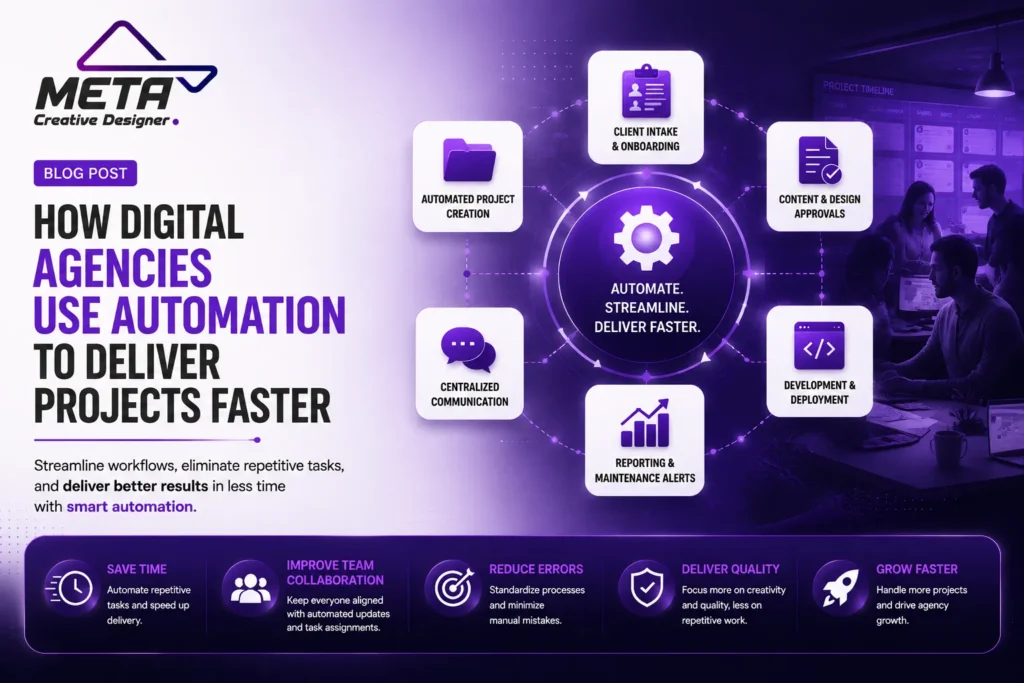
In addition, there are ways agencies can automate:
Automating Client Intake and Onboarding
Design and content approvals
The development and deployment of the products. Development and deployment of the products.
Alerts for reporting and maintenance.
Automation offers a more streamlined delivery system, but professionals are still required to be strategic, creative, and accurate and manage client relationships.
Client intake and onboarding is automated. Client intake and onboarding is automated.
A digital project can start off with emails, questionnaires, discovery calls, contracts, invoices, and requests for brand assets. Manually handling these steps with each client may delay a project until production.
The automated intake forms capture the critical information needed by the agencies: business objectives, desired audience, services, look, timeline, website features, and content.
Once it is submitted, the details can automatically add a client record, alert the account manager, assign an internal job, and message the client to confirm that the job was submitted.
Triggers and actions are features in database tools like Airtable that enable teams to create automations. When a new record or status change occurs, a workflow can be activated, sending messages, updating records, or linking information with other platforms. Airtable also needs to be tested with automations so that teams can ensure that the trigger and actions are functioning properly before implementing them.
A structured onboarding process reduces the number of repeated questions and ensures that designers, writers, and developers get the information they need.
Creating Projects Automatically
After a project gets approved, the agencies can create a standard project structure without having to build it from scratch.
This workflow can produce:
- The stages and deadlines of a project.
- Tasks related to design and development.
- Client approval checkpoints
- Content requirements
- Quality-assurance checklists
- Internal and client folders.
- Communication channels
Project-management templates help ensure that all critical steps aren’t overlooked. Discovery, sitemap planning, content preparation, design, development, mobile testing, SEO setup, client review, and launch for a website project are all potential steps.
Tasks may be assigned to automation rules according to the project type or the project’s status. Asana Rules, for instance, automate workflow by moving it around in processes. Selected conditions trigger the reassignment, removement, updating, or adding of subtasks to tasks.
This provides uniformity without uniformity. Even though the workflow has been standardized, teams can modify it per client needs.
Improving Task Assignment and Handoffs
After a project gets approved, the agencies can create a standard project structure without having to build it from scratch.
This workflow can produce:
- The stages and deadlines of a project.
- Tasks related to design and development.
- Client approval checkpoints
- Content requirements
- Quality-assurance checklists
- Internal and client folders.
- Communication channels
Project-management templates help ensure that all critical steps aren’t overlooked. Discovery, sitemap planning, content preparation, design, development, mobile testing, SEO setup, client review, and launch for a website project are all potential steps.
Tasks may be assigned to automation rules according to the project type or the project’s status. Asana Rules, for instance, automate workflow by moving it around in processes. Selected conditions trigger the reassignment, removement, updating, or adding of subtasks to tasks.
This provides uniformity without uniformity. Even though the workflow has been standardized, teams can modify it per client needs.
Centralizing Communication
Teams at agencies frequently share information via e-mail, chat, project-management platforms, design feedback, and meeting minutes. If there’s no system, important decisions can be hard to find.
Automated communication workflows can push out project updates to a designated channel, alert reviewers when approval is needed, and receive requests using a standardized form.
Slack Workflow Builder enables trigger-based workflows, conditional paths, forms, messages, and connectors with other tools. Its AI features can also enable users to generate workflows using natural language instructions.
These workflows can be utilized by an agency to gather website change requests, document technical concerns, get content approval and inform the team of any new files uploaded by the client.
This isn’t to increase notifications. Good automation means getting the right information to the right person and minimizing extraneous information and multitasking.
Accelerating Research and Content Production
If you have to prepare content, it can take time to get website and marketing projects off the ground, especially if limited written material is provided by the client.
AI-powered workflows support agencies in developing first outlines, structuring discovery notes, summarizing client data, drafting questions for interviews and providing first drafts. Then a different team with content expertise can tailor the content to fit the brand voice, services, audience and business goals.
Through automation, you can also reuse approved content. A detailed article can be an email, social media caption, landing page section, FAQ and short promotional message.
Agencies, however, must never share unedited AI-generated content. All drafts need to be read for accuracy, originality, tone, unsupported claims, and if pertinent, for the relevance to the customer.
The quickest process isn’t the one that creates the most material. It is one that is going to make a helpful first draft and maintain professional editing and approval.
Streamlining Design Systems
Digital agencies can execute projects quicker if designers don’t design every button, form, card, or section of a page.
A design system can have reusable typography, colors, spacing rules, buttons, navigation patterns, form elements, cards, responsive components and more. Designers can quickly build pages keeping the visual consistency.
Global updates are also easier due to the automation and shared variables. You can update many parts of a project with a change in one of the primary colors, spacing value, or button style.
This will minimize inconsistent style and simplify future web changes. It also provides a set of unambiguous guidelines for implementing the design.
The use of reusable components should not be looked upon as an excuse to build generic websites. It should not only speed up the production process but also allow for a unique visual identity and customer experience.
Reducing Design-to-Development Delays
The lack of handoff between designers and developers can result in clarification meetings, spacing errors, out-of-date screens, and rework.
Figma Dev Mode allows designers and developers to collaborate from the same source with tools like inspection, version comparisons, development status, annotations, component information, and links to platforms like Jira, Storybook, and GitHub. Designs may be checked as ready for development, and developers can view existing specifications without having to rely on snapshots or on their own documents.
While it’s not full automation, it eliminates repetitive handoff tasks and aids in the understanding of design choices.
Agencies can refine the process even further by setting standards. It is important that the content of a design, its mobile behavior, interactions, and assets required are reviewed before marking it as ready.
Allowing Teams to Work in Parallel
Traditional workflows can lead to a person waiting for the other person. Different people in the team can work simultaneously on the same project without affecting the live project using modern collaboration systems.
For instance, with Webflow page branching, a separate copy of the page will be created, allowing teams to make and review changes without immediately affecting the main website. Branches can be reviewed, updated, merged, and checked for conflicts. Several co-workers can also work together, in real time, on a branch.
If you have parallel workflows, you can cut down a considerable amount of waiting time. Someone may be making enhancements to the homepage, while someone else is creating a service webpage and a developer is developing forms, integrations, etc.
There is a need for naming rules and ownership and approval controls for the agency. Several people working on the same changes at the same time without coordination makes parallel work confusing.
Automating Development Testing
The developers remove repetitive checks prior to publishing changes on the websites. These can range from building the project, testing code, formatting, and ensuring that some of the key features still function.
GitHub Actions is a continuous integration and continuous delivery service that enables you to automate your build, test, and deployment processes. Tests can be run at any time that someone pushes a change, and approved changes can be deployed after they are merged.
This can enable agencies to detect issues in advance. The workflow can detect an error before launch and halt the change and notify the development team.
Other deployment controls may also include requiring an approval for deployment, limiting who can deploy, protecting secrets, and preventing two different conflicting deployments from running concurrently.
Automated testing is not a substitute for manual quality assurance. It offers a consistent foundational piece that will capture repeatable technical issues.
Using Preview Environments for Faster Feedback
Back and forth screenshots can delay client approval. Preview environments are used to give clients and internal reviewers the opportunity to experience the website before it goes live.
Each deployment can have its own unique preview URL, and preview environments can test changes in a live environment without impacting the production site.
A client reviews a working version, can open the preview, and test the buttons; they can also view responsive layouts and give feedback. Developers can resolve issues and promote the approved version to production.
This will make the review process safer and clearer. The client is able to observe how the website works in practice, instead of reading a picture.
Access to preview copies of projects should be restricted if the project holds confidential material or unreleased products, customer information, or confidential business information.
Automating Quality Assurance
Quality assurance is more than just making sure a website is “good-looking.” Forms, navigation, responsive behavior, browser compatibility, accessibility, search settings, links, page speed and conversion tracking that is a lot of items that agencies need to audit.
Automated tools can check for common issues like broken links, missing metadata, code errors, oversized files, failed builds, etc. Project-specific reusable testing checklists can also be created automatically.
This is a practical process that involves automated testing and human review. A button could be present in software, but it takes a person to decide if the button is clear and where it is needed in the customer journey.
Testing during production rather than the last day improves agencies’ ability to deliver quickly.
Generating Client Reports Automatically
Creating reports manually can be labor intensive, requiring several hours per month. Agencies can have automated data collection for website traffic, campaign performance, conversions, leads, search visibility, and technical data.
A reporting flow can update the dashboards, prepare summaries, and send out periodic notifications to clients. This allows account managers to focus on interpreting the results rather than copying numbers between spreadsheets.
This report should be a meaningful report and not give the client too many metrics to consider. Qualified inquiries, appointments, purchases, cost per lead, conversion rate, and revenue are potential metrics that can be used depending on the project.
There is still a need for human interpretation. An experienced professional will have to tell you how performance changed and what to do next, while automation will demonstrate that there is a change in performance.
Automating Post-Launch Maintenance
Project delivery is not complete upon launch! The website needs updating, backup, security monitoring, form validation, performance monitoring, and content maintenance.
Automations can help agencies schedule backups, track uptime, alert them to certificates that are about to expire, send them alerts about failed forms, and inform the technical team of any problem that needs to be addressed.
Recurring tasks could also result in maintenance workflows generating regular tasks for plugin updates, content reviews, analytics checks, and client reports.
This helps maintain continuous service relationships and minimizes the chance that a vital maintenance task will be overlooked.
Avoiding Over-Automation
Improperly designed automation can cause duplicated tasks, needless notifications, confusing messages for clients, and broken workflows without anyone realizing it.
Each process that is automated should contain:
- A clear purpose
- A responsible owner
- Identified triggers and actions
- Error notifications
- Documented permissions
- An analog backup procedure
- Regular reviews
It is important that the agencies start with repetitive and high-volume tasks that have clear rules. Complex decisions, sensitive communication with the client, creative strategy, and final decisions should be made by the human.
Conclusion
Client Onboarding, Project Creation, Task Assignments, Communication, Design Handoffs, Development, Testing, Deployment, Reporting and Maintenance are amongst the many processes that digital agencies automate to speed up their client onboarding.
The best thing about it is not just that you will complete projects quickly. Automation provides a more standardized and predictable flow of information to the right person at the right time.
Good agencies don’t make relationships and creativity automatic. They take the repetitive tasks around them away.
With their perfect systems and professional strategy, digital agency design, technical skill and personal client service, digital agencies can complete projects efficiently without compromising on quality.
Frequently Asked Questions
What is digital agency automation?
Digital agency automation uses AI, integrations, templates, and workflows to reduce repetitive project tasks.
How does automation help agencies deliver projects faster?
It speeds up onboarding, task creation, approvals, communication, testing, deployment, and reporting.
Can agencies automate client onboarding?
Yes. Forms, contracts, project folders, welcome emails, and initial tasks can be created automatically.
How does automation improve task management?
It assigns tasks, updates project stages, sends reminders, and notifies team members when work is ready.
Can client reporting be automated?
Yes. Shared design systems, clear approval stages, and automated notifications reduce delays and confusion.
How does automation support website testing?
AI content should always be reviewed for accuracy, originality, relevance, tone, and customer value before publication.
Can website security and backups be automated?
Yes. Agencies can automatically collect analytics, conversions, campaign data, and scheduled performance reports.
Does automation replace agency professionals?
No. Strategy, creativity, client communication, quality control, and final approvals still require human expertise.
What are the risks of over-automation?
Poor automation can create duplicate tasks, unnecessary alerts, confusing messages, and unnoticed workflow failures.
What is the best way for agencies to use automation?
Automate repetitive and rule-based tasks while keeping creative decisions, client relationships, and important approvals human-led.